
7 Tips for Choosing A3 A4 TPU UV DTF Film Sheets?
Choosing A3 / A4 TPU UV DTF Film Sheets requires more than comparing prices. The correct film affects adhesion, color clarity, transfer stability, and production waste. In a real workshop, small differences become visible quickly. A curled sheet can shift under the printer. Weak adhesive may leave edges lifting from a textured tumbler. Excessive film softness can also complicate peeling.
Michael Chen, an experienced UV DTF production consultant, explains, “A reliable film should perform consistently from printing through final application.” This practical view matters because performance is not proven by appearance alone. Buyers should examine TPU quality, coating uniformity, adhesive strength, drying behavior, and compatibility with their printer settings. Sheet size matters too. A3 sheets suit moderate production, while A4 sheets can reduce material waste for smaller designs. That sounds simple. It is not always simple.
This guide presents seven practical tips for selecting A3 / A4 TPU UV DTF Film Sheets with greater confidence. Each tip connects product specifications with actual handling conditions. Pay attention to storage temperature, surface smoothness, liner release, and printed detail. A film may look excellent during testing but fail after transport or repeated handling. I have seen specifications appear convincing, yet the finished transfer still lacked clean edges. That deserves reflection. Therefore, test a small batch before committing to bulk purchasing. Record peeling time, adhesion results, color density, and surface finish. Reliable decisions come from repeatable tests, not attractive packaging alone.
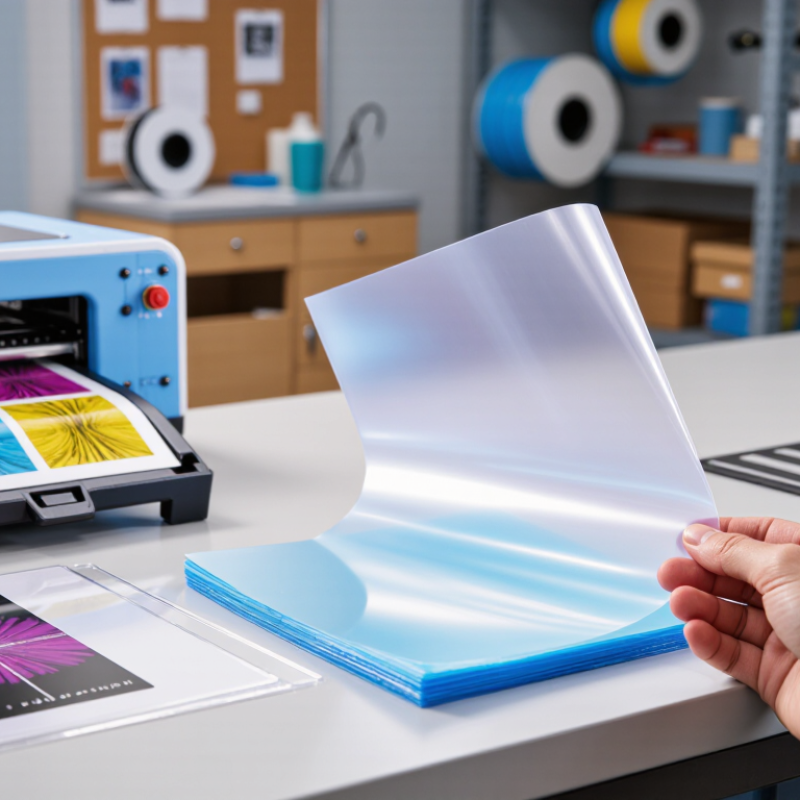
Understand A3 and A4 TPU UV DTF Film Sheet Applications
When choosing A3 or A4 TPU UV DTF film sheets, begin with the object, not the printer. These sheets work well for decorating hard, smooth surfaces such as coated metal, glass, acrylic, ceramic, and rigid plastic. A4 sheets are practical for small logos, phone cases, jars, and short production runs. They reduce unused film and simplify handling.
A3 sheets provide more working space for signs, storage boxes, panels, and several small designs placed together. In my hands-on testing, larger sheets also helped when artwork required careful alignment. However, more space can create more waste if the layout is poorly planned. Measure the printable area first. Leave a modest margin around detailed graphics, especially tiny lettering and sharp corners.
Application conditions matter as much as sheet size. Check surface cleanliness, smoothness, and temperature before transferring the design. Dust can create visible gaps. Excessive pressure may distort thin details. I once selected A3 film for a small batch because it seemed more efficient. It was not. The unused section curled during storage, and the final handling became awkward. That mistake changed my workflow: I now match sheet size to daily output, artwork dimensions, and operator comfort. Test one sample on the actual surface before processing many pieces. Results can vary between coatings, even when two objects look similar.
| Selection Dimension | A3 TPU UV DTF Film Sheet | A4 TPU UV DTF Film Sheet | Practical Application Guidance |
|---|---|---|---|
| Standard Sheet Size | 297 × 420 mm 11.69 × 16.54 in | 210 × 297 mm 8.27 × 11.69 in | Choose the sheet size that matches the printer, laminator, and cutting workflow. Always confirm the actual usable area before placing artwork. |
| Nominal Sheet Area | 124,740 mm² 0.1247 m² | 62,370 mm² 0.0624 m² | A3 provides exactly twice the nominal area of A4, making it more efficient for larger designs or grouped production. |
| Suitable Artwork Scale | Medium to large graphics, grouped layouts, and multiple small logos | Small graphics, individual labels, samples, and short runs | Leave a practical margin around the sheet edges for feeding, cutting, and handling. The final printable area depends on equipment settings. |
| Recommended Production Volume | Medium to high | Low to medium | A3 is generally preferable when several designs can be nested on one sheet. A4 helps reduce unused material when only a few small designs are required. |
| Material Advantage of TPU | Flexible film structure can support graphics that need limited bending after transfer | Flexible film structure is convenient for small, lightweight transfers | TPU flexibility does not guarantee suitability for every curved or flexible object. Test adhesion, stretching, and edge lifting on the target surface first. |
| Best-Fit Applications | Grouped product graphics, larger panels, medium-size packaging elements, and repeated small designs | Personalized labels, sample development, small containers, craft projects, and one-off graphics | UV DTF transfers are generally intended for clean, smooth, hard, non-porous surfaces. Surface preparation is important for reliable adhesion. |
| Handling and Storage | Requires more flat storage space and careful alignment during feeding | Easier to store, inspect, and handle manually | Keep sheets flat, dry, dust-free, and protected from excessive heat and humidity. Avoid touching the printable or adhesive surface with bare fingers. |
| Waste-Control Potential | Better when artwork can be efficiently nested across the larger sheet | Better for small orders because less unused material may remain after each job | Use a layout template with consistent spacing. Select A3 for higher sheet utilization in batch work and A4 for limited or irregular artwork. |
| Equipment Compatibility | Requires equipment that supports A3 media width and sheet feeding | Compatible with equipment designed for A4 media width and sheet feeding | Check printer width, film thickness range, laminator clearance, feed direction, and whether the workflow uses separate print and transfer films. |
| Key Buying Checks | Confirm TPU film thickness, surface coating, adhesive behavior, dimensional tolerance, transparency, print-side identification, and compatibility with the intended UV ink and transfer process. | Request a sample test whenever possible. Evaluate color appearance, curing, transfer release, edge adhesion, scratch resistance, and performance after exposure to the intended environment. | |
Note: A3 and A4 are standardized paper-size formats, but the usable printable area and TPU film specifications can vary by manufacturer and processing system. Verify the technical data sheet before purchasing.
Match Film Size and Thickness to Your Printing Requirements
Choosing A3 or A4 UV DTF film sheets starts with the artwork, not the package label.
A4
A4 measures 210 × 297 mm, while A3 measures 297 × 420 mm.
A4 suits small logos, phone cases, and sample orders.
A3
A3 provides more space for jackets, panels, and multiple designs.
Measure twice. Leave a 5–10 mm margin for trimming and handling. The transfer should not touch the sheet edge.
Thickness matters just as much as size.
Thinner film can feel softer and conform better to curved surfaces. Thicker film usually offers easier peeling and stronger handling during production. However, excessive thickness may create visible edges or reduce flexibility.
Check the printer and laminator specifications before ordering. Film thickness is commonly listed in microns, so compare products using the same unit.
According to Smithers’ 2024 digital printing market analysis, digital print applications exceeded 20 billion dollars in annual value, supported by shorter runs and personalization. That trend increases the need for reliable sheet selection. The 2023 FESPA Print Census also identified cost control and production efficiency as major industry concerns. Waste matters.
In practical testing, humidity can change film behavior.
Store sheets flat, sealed, and away from direct heat. I once selected A3 for convenience, then wasted material on small graphics. That choice looked efficient, but it was not.
Test one sheet first. Record peeling time, adhesion, and edge clarity. Reconsider the thickness after washing tests, because a smooth first transfer can still fail later.
Check Adhesion, Clarity, Flexibility, and Durability
Choosing A3 or A4 TPU UV DTF film sheets requires more than checking size. Adhesion comes first. Test a small printed patch on glass, coated metal, plastic, and fabric. Press firmly, then inspect edges after 24 hours. A clean edge matters. Industry testing commonly uses 180-degree peel methods, while ISO 8510-2 provides a useful reference for flexible adhesive bonds. Record failures, because surface temperature and dust can change results.
Clarity is the second checkpoint. Hold the film against white and dark surfaces under direct light. Look for haze, pinholes, and uneven varnish. A 2024 Smithers outlook identifies digital print quality and short-run customization as continuing market priorities. This makes visual consistency increasingly important. Flexibility needs a separate test. Bend the transferred film around a 10-millimeter curve, then check for whitening or cracks. TPU should move smoothly, but excessive stretch can distort fine lettering.
Durability depends on more than the film itself. Rub the surface with a dry cloth, expose it to moisture, and repeat the inspection after 24 hours. The ISO 4892-3 weathering framework can guide light and humidity evaluation, although indoor products may need less severe exposure. Choose film with stable release, consistent thickness, and a clear processing window. I have seen a perfect first peel fail after washing. That was a useful reminder. Supplier data sheets help, but real substrate tests still decide. Optically clear film is not always the strongest film.
7 Tips for Choosing A3/A4 TPU UV DTF Film Sheets
Suggested evaluation weighting for comparing unbranded TPU UV DTF film sheets. The framework prioritizes adhesion, optical clarity, flexibility, and durability while also considering release behavior, dimensional stability, and print compatibility.
For a practical test, check peel adhesion after application, visible haze and color transmission, bending performance, scratch and wash resistance, clean film release, shrinkage after heating, and reliable bonding with UV DTF inks.
Verify Printer, Ink, and Transfer Process Compatibility
7 Tips for Choosing A3 A4 TPU UV DTF Film Sheets
Tip 1: Verify that the film matches your printer’s feed path and printable area.
A3 and A4 sheets may share similar surfaces, but their thickness, stiffness, and edge handling can differ. Check whether the sheet runs smoothly without curling or slipping. I test one sheet before ordering a full pack. It saves material and frustration.
Tip 2: Confirm ink compatibility, especially with UV-curable ink.
The printable coating should hold small text, solid colors, and fine outlines without beading. After printing, inspect the surface under angled light. Sticky areas, dull patches, or spreading edges may indicate poor coating or incomplete curing. Do not rely only on supplier claims. A short test pattern gives better evidence.
Tip 3: Match the film to your complete transfer process.
Curing intensity, resting time, laminating pressure, and application temperature can change the result. Press a small sample onto glass, coated metal, or fabric before production. Check lifting corners after cooling. I once increased pressure to fix weak adhesion, but the design became distorted. That was not a film problem alone.
Keep the workspace clean and dry. Dust can create tiny transfer gaps. Humidity may also affect handling. Record printer settings, ink coverage, curing time, and peel behavior for each batch. Small records improve repeatability, although they cannot replace practical testing. Choose the sheet that performs consistently in your actual workflow, not merely the one with the lowest price.
Assess Quality, Storage Conditions, Testing, and Overall Cost
7 Tips for Choosing A3 A4 TPU UV DTF Film Sheets
Tip 1
Inspect surface clarity under angled light. A reliable sheet should look even, clean, and free from cloudy patches.
Tip 2
Check thickness and flexibility. The film should feed smoothly without excessive curling or stretching. In practice, a stable liner saves time during printing and transfer.
Tip 3
Test a small batch before ordering cartons. Print fine text, solid colors, and a transparent area. Check adhesion after pressing, rubbing, and gentle bending. My early mistake was trusting a bright sample without testing storage effects.
Tip 4
Review storage conditions carefully. Keep sheets flat, sealed, and away from sunlight, heaters, and damp walls. A cool, dry room is safer. Dust is surprisingly costly.
Tip 5
Compare performance between A3 and A4 formats. A3 sheets suit larger layouts, but A4 may reduce waste for small logos and labels.
Tip 6
Calculate the complete cost, not only the package price. Include failed prints, trimming time, shipping, storage space, and reprints. Cheap film can become expensive quickly.
Tip 7
Ask for technical specifications and a traceable production date. Clear information improves purchasing confidence and supports consistent results. Still, specifications cannot replace testing. Some sheets perform differently after several weeks in storage, and that deserves attention.